
Choose off-the-shelf software when your process is standard, speed matters more than differentiation, and the product meets most requirements without extensive workarounds. Consider a custom web application when the workflow is specific to your business, several systems must work together, or software directly affects your competitive advantage.
The decision should not begin with technology. It should begin with the process, the cost of its current limitations, and the degree of control the business needs.
This guide compares both options across cost, launch speed, customization, integration, data control, security, and long-term ownership. It also explains when a hybrid approach produces the best result.

The Difference Between the Two Options
Off-the-shelf software is a product designed for many customers. The vendor defines its core features, release schedule, pricing structure, and operating model. Customers configure the product and may extend it through settings, APIs, plugins, or marketplace applications.
A custom web application is designed around the requirements of one organization or product. The owner determines the workflows, permissions, integrations, user experience, and roadmap. The application still uses existing frameworks and cloud services; custom does not mean writing every technical component from zero.
Custom and Off the Shelf Software Compared
| Decision factor | Off-the-shelf software | Custom web application |
|---|---|---|
| Initial cost | Usually lower | Usually higher |
| Time to launch | Days or weeks | Weeks or months |
| Workflow fit | Based on vendor’s model | Designed for your process |
| Customization | Limited to available settings and extensions | Controlled by product requirements and budget |
| Integrations | Depends on vendor APIs and marketplace | Can be designed around required systems |
| Data control | Governed by vendor terms and architecture | Greater control over storage, access, and portability |
| Maintenance | Vendor maintains the core product | Owner funds maintenance and development |
| Roadmap | Vendor controls priorities | Business controls priorities |
| Scaling cost | Subscription increases with seats, usage, or features | Infrastructure and development costs increase with usage and scope |
| Vendor dependency | High | Shifted toward the development and hosting ecosystem |
Neither option is inherently better. The better option is the one that supports the business process at an acceptable total cost and risk.
When Off the Shelf Software Is the Better Choice
The Process Is Common Across Many Businesses
Accounting, payroll, email marketing, video meetings, and basic project management are well-served by established products. Building these capabilities from scratch rarely creates an advantage for a small or mid-size business.
A mature product also includes years of edge cases, documentation, support, and integrations. Reproducing that breadth can cost far more than a subscription.
You Need to Launch Quickly
An existing platform can often be configured in days or weeks. That speed matters when the business must solve an immediate operational problem, meet a deadline, or test whether a new process will work.
Buying first can also be a useful learning step. The team discovers which features matter before investing in a custom product.
The Requirements Are Likely to Stay Standard
Off-the-shelf software is a good fit when the team can follow the product’s workflow without harming service quality or creating significant manual work.
The important test is not whether every preference is supported. It is whether the unsupported requirements materially affect revenue, cost, risk, or customer experience.
The Business Cannot Support Product Ownership
Custom software needs an owner who can prioritize work, answer domain questions, review releases, and plan ongoing improvements. If no one can take that responsibility, a managed product may be safer.
When a Custom Web Application Makes Sense
Your Workflow Is Part of the Competitive Advantage
Some businesses win because they quote faster, coordinate complex fulfillment, make better use of data, or provide a customer experience competitors cannot match. A generic product may force those companies into the same workflow as everyone else.
Custom development is easier to justify when software strengthens a process that customers value or reduces a recurring operational constraint.
Employees Depend on Manual Workarounds
Warning signs include duplicate data entry, spreadsheet handoffs, repeated copying between systems, approvals managed in email, and reports assembled manually every week.
One workaround is rarely a reason to build software. A chain of workarounds across a high-volume process may be. The business case improves when the time, error rate, or delayed revenue can be measured.
Several Systems Need to Work as One
An organization may use a CRM, accounting platform, inventory service, customer portal, and industry-specific database. Off-the-shelf connectors can cover common data flows, but unusual business rules may still require manual reconciliation.
A custom web application can become the workflow layer across those systems. It does not always replace them. It can provide one interface, enforce business rules, and send data to the right platform through APIs.
You Need Greater Control Over Data and Permissions
Custom development gives the business more influence over where data is stored, how permissions work, how long records are retained, and how information is exported. That control can matter when customers require specific security terms, auditability, or data residency.
Control also creates responsibility. The owner must maintain the application, manage access, monitor vulnerabilities, and keep dependencies current. NIST recommends integrating secure development practices throughout the software lifecycle rather than treating security as a one-time launch task.
Vendor Limits Are Restricting Growth
A platform can be a good choice at one stage and a constraint later. Common signals include:
- per-user or usage fees growing faster than the value received;
- a required feature remaining outside the vendor roadmap;
- API limits blocking important automation;
- reporting that cannot represent the business model;
- customers asking for an experience the platform cannot provide;
- mergers or new product lines creating workflows the original tool cannot support.
The case for custom development should compare the cost of change with the cost of remaining on the current system.
The Hidden Costs of Off the Shelf Software
Subscription price is easy to see. The surrounding operating cost is harder to measure.
Configuration and Implementation
Enterprise products may require paid onboarding, consultants, data migration, workflow configuration, and staff training. A lower license price does not always mean a low implementation cost.
Add-ons and Higher Tiers
Features such as advanced permissions, audit logs, API access, automation, and analytics may only be available in higher plans. Costs can increase with seats, contacts, transactions, storage, or API calls.
Manual Work Around the Product
If employees export data to spreadsheets, correct records by hand, or repeat the same step across multiple tools, the subscription price understates the real cost.
Calculate the hours spent on those tasks, the cost of errors, and the delay created in the underlying process.
Switching and Data Portability
Before selecting a platform, confirm how data can be exported, which formats are available, and whether attachments, activity history, permissions, and relationships are preserved. Migration becomes expensive when important context cannot leave the system cleanly.
The Hidden Costs of Custom Software
Custom development also carries costs beyond the initial build.
Discovery and Decision Making
The business must define what the application should do. That work requires time from employees who understand the process, even when an agency leads discovery.
Maintenance and Operations
The owner pays for monitoring, hosting, backups, security updates, bug fixes, and compatibility with third-party services. A realistic budget includes post-launch support.
Roadmap Discipline
Control over the roadmap creates an endless supply of feature requests. Without clear priorities, a custom product can become larger and more expensive without improving the key business outcome.
Team Continuity
Documentation, source control, deployment automation, account ownership, and a clear handover reduce dependence on individual developers. Ask how the application can be maintained if the original team changes.
Total Cost of Ownership Over Three Years
A useful comparison includes every relevant cost over the same time period.
For off-the-shelf software, calculate:
- implementation and migration;
- subscription fees at expected seat and usage levels;
- paid add-ons and integrations;
- consulting and administration;
- manual work caused by workflow gaps;
- expected switching cost.
For custom software, calculate:
- discovery, design, development, and launch;
- data migration and integrations;
- infrastructure and third-party services;
- maintenance and security;
- internal product ownership;
- planned enhancements.
Do not assume custom software becomes cheaper after a specific number of years. That outcome depends on development cost, subscription growth, maintenance, and the value created by a better workflow. The comparison should use the company’s actual volumes and labor costs.
The Hybrid Option
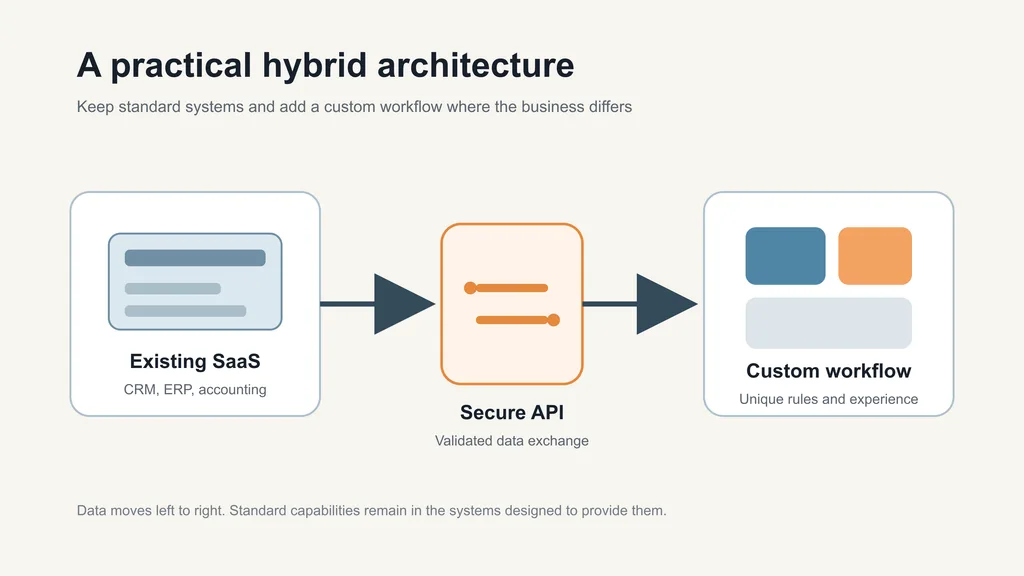
Many businesses do not need a pure build-or-buy decision. A hybrid approach keeps established products for standard capabilities and adds custom software where the workflow is unique.
Examples include:
- a custom customer portal connected to an existing CRM;
- an operations dashboard using data from accounting and inventory systems;
- a quoting workflow that sends approved orders into an ERP;
- a tailored reporting layer across several SaaS products;
- a custom marketplace using a third-party payment provider.
This approach can reduce cost and launch time because the business does not rebuild commodity services. It still requires careful integration planning. Vendor APIs, rate limits, authentication, and data ownership become part of the architecture.
AWS guidance for SaaS providers reflects a related principle: shared products should support variation through controlled, reusable configuration instead of separate one-off versions for each customer. For a buyer, this means checking whether a vendor’s supported configuration can meet the requirement before commissioning a custom workaround.
A Practical Decision Framework
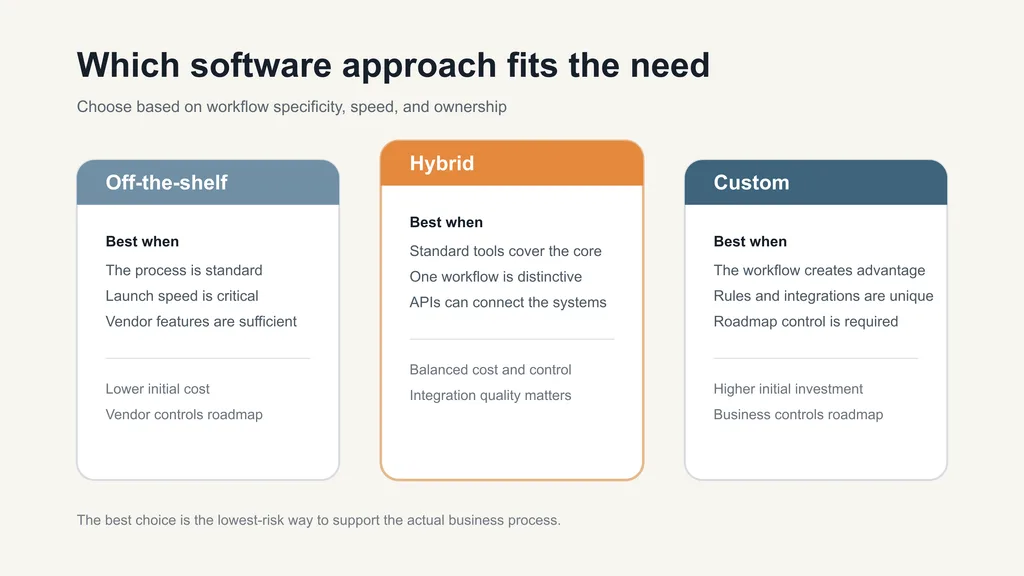
Score each statement from 0 for not true to 3 for strongly true.
| Statement | Score |
|---|---|
| The workflow is specific to how our company competes | 0-3 |
| Existing products require expensive manual workarounds | 0-3 |
| Several systems must follow custom business rules | 0-3 |
| We need control over the product roadmap | 0-3 |
| Data, permission, or audit requirements are unusual | 0-3 |
| Subscription costs will grow sharply with our expected usage | 0-3 |
| We have an owner and budget for ongoing product development | 0-3 |
A high score suggests that custom development deserves serious evaluation. A low score suggests configuring an established product first. The score is a conversation tool, not a purchasing formula. One critical security or integration requirement can outweigh several lower-priority factors.
How to Evaluate an Off the Shelf Product
Before buying, run a short pilot with real users and representative data. Ask them to complete the actual workflow rather than watching a sales demonstration.
Confirm:
- Which requirements are supported natively.
- Which require configuration, an add-on, or custom integration.
- What the product costs at expected usage in years two and three.
- How data can be exported and migrated.
- What the API limits and support terms are.
- How permissions, audit logs, backups, and incident handling work.
- Whether the vendor roadmap aligns with the capabilities you will need.
Record every workaround introduced during the pilot. Those workarounds often determine the total cost more than the feature checklist.
How to Scope a Custom Web Application
Start with the business outcome and one core workflow. Define the users, decisions, data, integrations, and exceptions involved in that workflow.
The first release should prove that the application improves the process. Secondary dashboards, advanced preferences, and edge-case automation can follow after users validate the foundation.
Request an estimate that separates discovery, design, engineering, QA, launch, and ongoing support. If you need budget guidance, review the companion article on web application development cost in 2026.
How Five Bricks Approaches the Decision
Five Bricks provides website development, web applications, e-commerce products, mobile apps, MVP development, and custom CRM or CMS solutions. Because the agency works across strategy, design, engineering, QA, and support, the engagement can begin with the decision rather than an assumption that every problem requires a new application.
Discovery should identify whether an existing product, a custom integration, a focused application, or a larger platform best supports the workflow. When custom development is justified, the same findings become the basis for architecture, design, and a phased delivery plan.
If your team has outgrown its current software, document the manual work, system limitations, user groups, and required integrations. Five Bricks can help evaluate the options and define a practical next step.
Frequently Asked Questions
Custom software usually has a higher initial cost. Over time, the comparison depends on subscriptions, usage, manual work, maintenance, and the value of a better workflow. Use a multi-year total cost of ownership model rather than comparing the build price with one month of licensing.
A focused first release often takes 8-14 weeks. A platform with several roles and integrations may require 3-6 months or more. Discovery is needed for a dependable estimate.
Often, yes. Configuration, APIs, plugins, automation platforms, and vendor marketplaces can cover many requirements. The limits depend on what the vendor exposes and supports. Heavy customization may create upgrade, reliability, or maintenance problems.
Ownership depends on the contract. Confirm ownership of source code, designs, cloud accounts, domains, data, and third-party licenses before development begins.
The largest risk is building more than the business can validate, operate, or maintain. Reduce that risk through discovery, a focused first release, regular demonstrations, documented ownership, and a funded maintenance plan.
Consider replacement when measurable workflow gaps, integration limits, pricing, data requirements, or roadmap dependency create a recurring cost greater than the expected cost and risk of change.